BUILDING FUNDAMENTALS
How to Build a Minecraft Sphere: Layer-by-Layer Plans
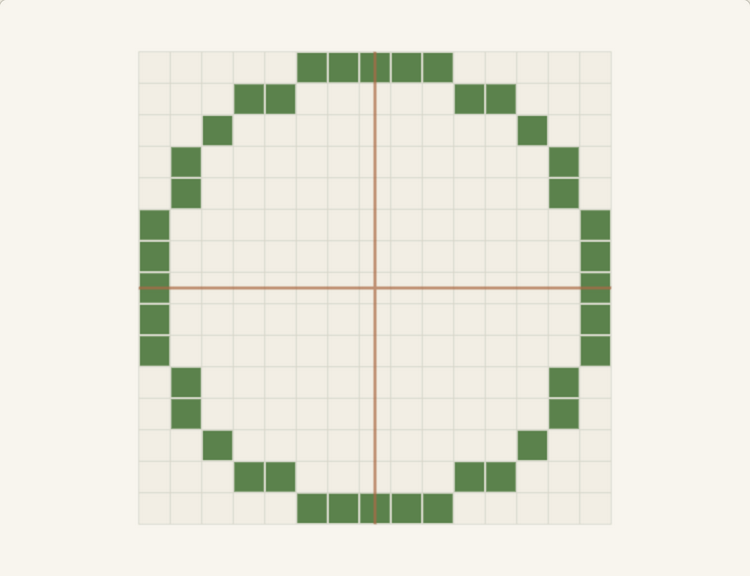
Spheres are circles stacked with a plan
A Minecraft sphere is a sequence of horizontal slices, and each slice is a circle of a different width: thin rings near the top and bottom, near-full circles through the middle. Build the slices in order and the curve assembles itself; improvise them and the ball develops flat sides and lumpy bands.
The sphere generator draws every layer of any diameter from 3 to 128 as a top-down grid, with the block count for each layer and the volume total, so the numbers below come straight from the same math the tool uses.
Pick the diameter from the material count
Sphere block counts grow steeply with size, and hollow versus filled is a fivefold difference on a 21-block ball. Verified counts for the most useful diameters:
- 15 blocks: 530 blocks hollow, 1,791 filled — a roomy decorative ball or planet.
- 21 blocks: 1,082 blocks hollow, 4,945 filled — the classic globe; the hollow shell leaves a climbable interior.
- 31 blocks: 2,382 blocks hollow — a build-project scale; treat it as several sections and verify each band.
Hollow or filled?
Filled spheres suit solid props: planets, cannonballs, boulders, and any build where the inside will never be seen. The middle layers of a filled 15-block sphere contain around 180 blocks each, which is why the full count climbs so fast.
Hollow shells are the standard for anything with an interior: floating islands with a hidden base, observatories, and giant mob-proof orbs. A hollow shell is one block thick, so every block you place is visible structure — there is no wasted interior fill.
The layer-by-layer workflow
Work bottom to top, one verified layer at a time. The bottom layers of a hollow sphere are narrow rings, the middle layers are the widest circles you will place, and the top layers mirror the bottom exactly — which means every layer has a twin you can compare against.
- Choose the diameter and mark the ground footprint: the widest layer's circle, from the circle chart if you want a printable reference.
- Set the generator to layer 1 and place the bottom ring on the footprint's center.
- Step up one layer at a time, placing each grid before moving up; the middle layer is exactly half the diameter high.
- Compare each upper layer with its mirrored lower twin before placing it — they must match block for block.
- Build a center columnA temporary pole at the sphere's center height gives every layer a height reference without counting blocks each time.
- Scaffold in ringsStand one ring of temporary blocks outside each layer while placing; remove them after the band closes.
- Check the equatorThe middle layer must equal the footprint circle exactly. If it does not, a lower layer drifted.
Common sphere building mistakes
Three issues cause most failed spheres. First, eyeballing the middle layers because they look 'round enough' — the equator defines the whole shape, so count it like any other layer. Second, mixing hollow and filled logic: a shell with one filled band bulges visibly from outside. Third, forgetting that spheres need two extra blocks of clearance on every side for scaffolding; a 21-block sphere is a 25-block construction site.
For domes instead of full balls, the same layer logic applies with half the layers: a 15-block dome is 285 blocks in 8 layers, and a 21-block dome is 569 blocks in 11 layers.